#Setting up Flutter development on WSL2
##Table of Contents
- Introduction
- The mobile development landscape
- Why Flutter?
- Why develop in WSL2?
- Setting up Flutter in WSL2
- Creating a project and debugging wirelessly
- Wrapping up
##Introduction
About a year into learning front-end development, Next.js has helped me build most of what I want for the web1.
I’ve spent that year making web apps, but lately more of my ideas have been for mobile apps.
I already have about three ideas I’d like to turn into working apps.
Therefore, I had been putting it off because I wanted to keep studying forever Flutter until I finally decided to face it.
This time, it's a memo on the personal background of why I chose Flutter and the steps to set up the Flutter development environment on Ubuntu20.04 on WSL2.
It would be great if it helps someone who is also struggling with the same issues.
##The mobile development landscape
The methods for developing mobile apps have become more diverse in recent years.
This is due to the development of cross-platform development such as Flutter and React Native, in addition to native development that implements Android and iOS applications separately.
Traditionally, when it comes to mobile app development, Android was developed using Java (and Kotlin since a few years ago), and iOS was developed using Swift.
However, developing separately means that there are two pieces of code that need to be managed.
The time spent on updates and bug fixes also increases accordingly.
In such a situation, cross-platform frameworks like Flutter and React Native were developed so that we could develop both Android and iOS applications with a single code.
The ability to implement an app that works in multiple environments with a single code means that, in addition to the management cost of the aforementioned source code, it also reduces the learning cost by allowing only one language to be learned.
For example, with Flutter, you develop it using the Dart language, and with React Native, you develop it using JavaScript.
However, there is no such thing as saying that native development for Android and iOS apps has become outdated.
In recent years, we have also seen examples of switching from cross-platform development to native development.
- Until "Study Supporter" graduates from React Native, or gratitude and respect for technical debt
- For me, React Native is the Swiftization that DMM, who was "difficult", worked on to break out of debt
I think we choose native development because it is superior to cross-platform development in the following points.
- Performance is good
- It is easy to follow with the OS updates.
- The response to new features at the OS level is quick.
Therefore, as I mentioned earlier, I think it's good to consider that the methods for mobile app development are diversifying and there are more options available.
##Why Flutter?
It is undoubtedly a good thing that there are more options, but it also means that there are more things to worry about.
I think it's best to consider the following 2 steps to organize your confused mind.
###Native or cross-platform?
This point is an element that also affects the skills one possesses.
However, for personal development, I think cross-platform development is almost definitely the best option.
It would be good if you could secure engineers for both Android and Swift for development at the enterprise level, but I think it can be difficult to maintain two source codes for personal development or small team development.
By the way, considering my technical level, I was making Android apps as a hobby about 10 years ago.
In terms of Android versions, it's the 2.x era.
At that time, there was no Android Studio yet, and I remember developing with Eclipse.
Therefore, you will have almost no knowledge of current Android native development.
By the way, I haven't developed iOS apps (I'm an Android user, after all).
I didn't think it was realistic to learn app development for Android and iOS separately, so I chose cross-platform development.
###Flutter or React Native?
The second step is deciding what to choose as a framework for cross-platform development.
I think the current options are between Flutter and React Native.
Of course, there are other frameworks such as Xamarin, but considering the level of excitement, it seems it would be better to choose from the two mentioned above.
Here’s how the two frameworks compare:
| Flutter | React Native | |
|---|---|---|
| Developer | ||
| Language | Dart | JavaScript |
| First release | 2018 | 2015 |
What is noteworthy here is that the developer of Flutter is Google, the developer of Android.
Since Google is putting considerable effort into developing Flutter, it is possible that the difference between native development and Flutter will be narrowing, at least in terms of Android development.
It's also important that the project doesn't seem likely to suddenly terminate.
On the other hand, one of the attractions of React Native is that it can be developed using JavaScript.
I haven't actually touched it, but based on what I saw the way it's written, I felt it was very similar to React code.
I also use Next.js, so at first I wanted to choose React Native.
However, after considering various options, I chose Flutter for the following reasons.
- It seems that Flutter is currently more advantageous.
- Expectations for Google as the Developer
- It doesn't seem like the learning cost of Dart is particularly high.
- With React Native, even if you have to switch to it, it doesn't seem like the barrier would be that high.
It's fun to learn a new language2
Honestly, you could choose either one.
It seems that starting studying sooner than that is more valuable (a reminder to myself who has been struggling with this for a long time).
##Why develop in WSL2?
I usually use Windows devices at home.
On the other hand, we use Ubuntu as our main operating system at work.
Since I want to make sure the environment at home and work are as similar as possible, I am programming on my home PC using Ubuntu 20.04 on WSL2.
When trying to develop directly on Windows, you often run into problems with environment setup, so it's usually easier to do it on WSL2.
Therefore, we decided to build the mobile application development environment in Flutter on WSL2.
Below, I will document the work for reference.
##Setting up Flutter in WSL2
We will explain the Flutter environment setup steps in a step-by-step manner.
This time, we will code using VSCode and aim to reach a state where we can perform wireless debugging on an actual Android device.
Please note that we will not cover the installation of WSL2 or the installation of Ubuntu.
I also use zsh as my shell.
If you are using a different shell, please substitute accordingly.
###Installing the Java SDK
sudo apt install default-jdk
echo "\n\nexport JAVA_HOME=/usr/lib/jvm/java-11-openjdk-amd64\nexport PATH=\$PATH:\$JAVA_HOME/bin\n" >> ~/.zshenv
source ~/.zshenv
###Installing the Android SDK
mkdir -p ~/android/sdk/cmdline-tools
wget https://dl.google.com/android/repository/commandlinetools-linux-7302050_latest.zip -O latest.zip
sudo apt install unzip
unzip latest.zip
mv cmdline-tools ~/android/sdk/cmdline-tools/latest
rm -rf latest.zip
echo "\nexport ANDROID_HOME=\$HOME/Android/SDK\nexport PATH=\$PATH:\$ANDROID_HOME/cmdline-tools/latest/bin\n" >> ~/.zshenv
source ~/.zshenv
sdkmanager
If you run the sdkmanager command and see the following output, it's OK.
[=======================================] 100% Computing updates..
Next, install platform-tools because you will be using adb(Android Debug Bridge).
sdkmanager --install "platform-tools"
echo "\nexport PATH=\$PATH:\$ANDROID_HOME/platform-tools\n" >> ~/.zshenv
source ~/.zshenv
adb
If the help is displayed using the adb command, that's okay.
Next, we will install the Android SDK.
As of October 2021, the latest version is Android 11 (API level 31), so I will install it.
You can check the images that can be installed with the following command.
sdkmanager --list
Select the image to install and then install it.
sdkmanager --install "system-images;android-31;google_apis;x86_64" "platforms;android-31" "build-tools;31.0.0"
After that, you need to agree to the license terms of the installed image.
I will execute the following command and agree to all terms.
sdkmanager --licenses
###Installing Flutter
Check the version on the official installation page and install it.
As of October 2021, the latest version is 2.5.2, so I will install it.
mkdir ~/flutter
wget https://storage.googleapis.com/flutter_infra_release/releases/stable/linux/flutter_linux_2.5.2-stable.tar.xz
tar xf flutter_linux_2.5.2-stable.tar.xz
mv flutter ~/flutter/sdk
echo "\nexport FLUTTER_ROOT=\$HOME/flutter/sdk\nexport PATH=\$PATH:\$FLUTTER_ROOT/bin\n" >> ~/.zshenv
source ~/.zshenv
Output the version of Flutter as follows, that's okay.
$ flutter --version

Flutter 2.5.2 • channel stable • https://github.com/flutter/flutter.git
Framework • revision 3595343e20 (3 days ago) • 2021-09-30 12:58:18 -0700
Engine • revision 6ac856380f
Tools • Dart 2.14.3
Please run the flutter doctor command and confirm that the environment has been successfully set up without any issues.
The output result was as follows.
$ flutter doctor

Doctor summary (to see all details, run flutter doctor -v):
[✓] Flutter (Channel stable, 2.5.2, on Ubuntu 20.04.3 LTS 5.4.72-microsoft-standard-WSL2, locale ja_JP.UTF-8)
[✓] Android toolchain - develop for Android devices (Android SDK version 31.0.0)
[✓] Chrome - develop for the web
[!] Android Studio (not installed)
[✓] Connected device (1 available)

! Doctor found issues in 1 category.
###Installing the VS Code extensions
Launch VSCode in the WSL2 environment and install the extensions.
The code launches VSCode.
Note that I will not be including the installation steps for VSCode.
code .
I install the following extensions.
Installing the Flutter extensions should also install the following Dart extensions.
Please confirm.
By now, the environment setup is complete.
##Creating a project and debugging wirelessly
###Creating a project
You can create a Flutter project with the following command.
(test_app is the project name. You can set a free name and it's OK.)
flutter create test_app
###Wireless debugging on Android
To enable wireless debugging, change the settings on your Android device.
By the way, I am using a Google Pixel 5 (Android 11).
The settings screen may vary slightly by device.
Enabling developer options
First, I enable developer options.
Please tap "Settings" → "Device Settings" → "Build Number" seven times.
When activated, the "Developer Options" item will appear in the "Settings" → "System" menu.
Enabling wireless debugging
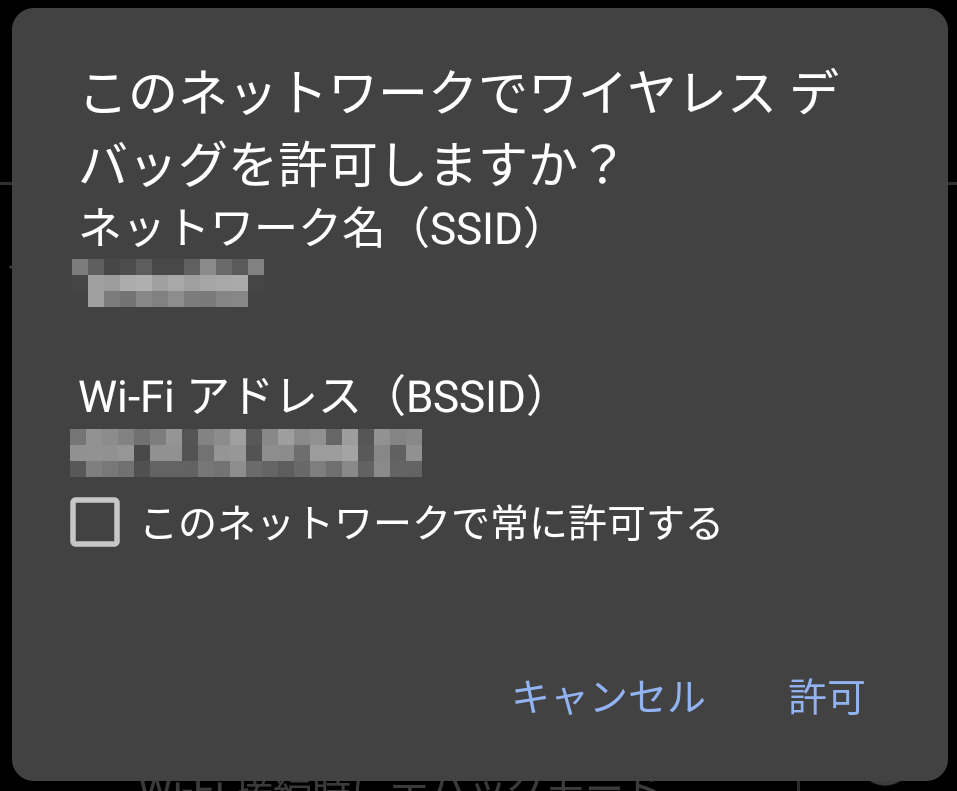
Turn on "Wireless Debugging" under "Developer Options" in Settings > System.
A confirmation screen will be displayed, so click on "Allow".
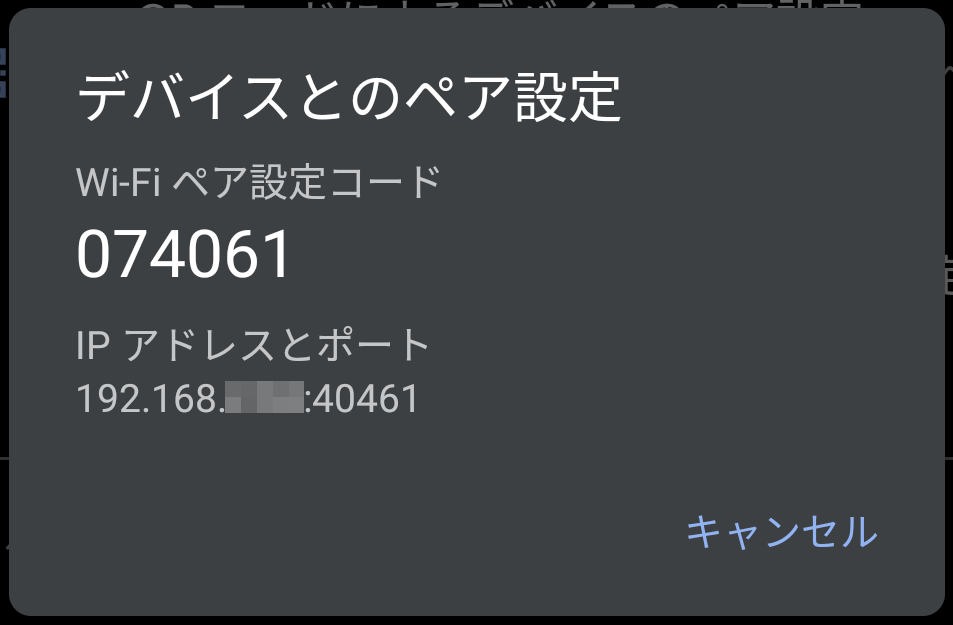
Then, tap "Wireless Debugging" → "Pairing device with pairing code."
The pairing setup code and IP address and port will be displayed as follows.
Use this information to perform pairing.
Pairing the device
We will perform pairing using the IP address and port we discussed earlier.
$ adb pair 192.168.xxx.xxx:40461

Enter pairing code: 074061
Successfully paired to 192.168.xxx.xxx:40461 [guid=adb-xxxxxxxxxxxxxx-xxxxxx]
Once you set up this pairing, it will not be necessary for subsequent uses.
Connecting to the device
Then connect to the device.
In this case, use the port number displayed in "IP Address and Port" under "Developer Options" → "Wireless Debug" instead of the port used during pairing.
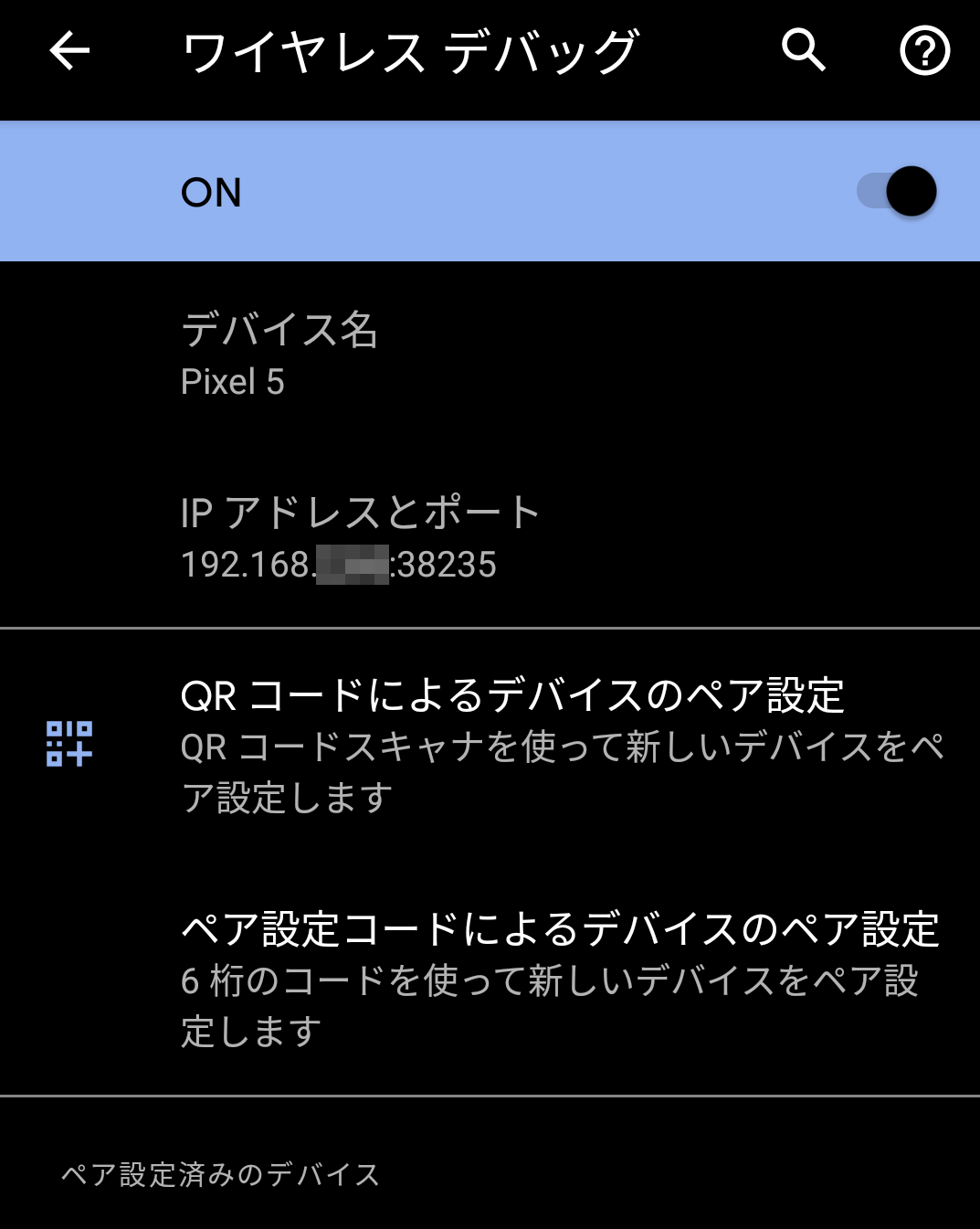
Let's connect and see how it goes.
$ adb connect 192.168.xxx.xxx:38235

connected to 192.168.xxx.xxx:38235
You can check the connected devices with the following command.
In the following example, Chrome is also displayed, but it's OK if an Android device is connected.
$ flutter devices

2 connected devices:

Pixel 5 (mobile) • 192.168.xxx.xxx:38235 • android-arm64  • Android 11 (API 30)
Chrome (web)     • chrome             • web-javascript • Google Chrome 94.0.4606.71
Running the app on the device
Move to the project directory and open it in VSCode.
cd test_app
code .
Open lib/main.dart and press the F5 key to start debugging.
It takes a little time to build, but once the build is completed successfully, the sample app will launch as follows.
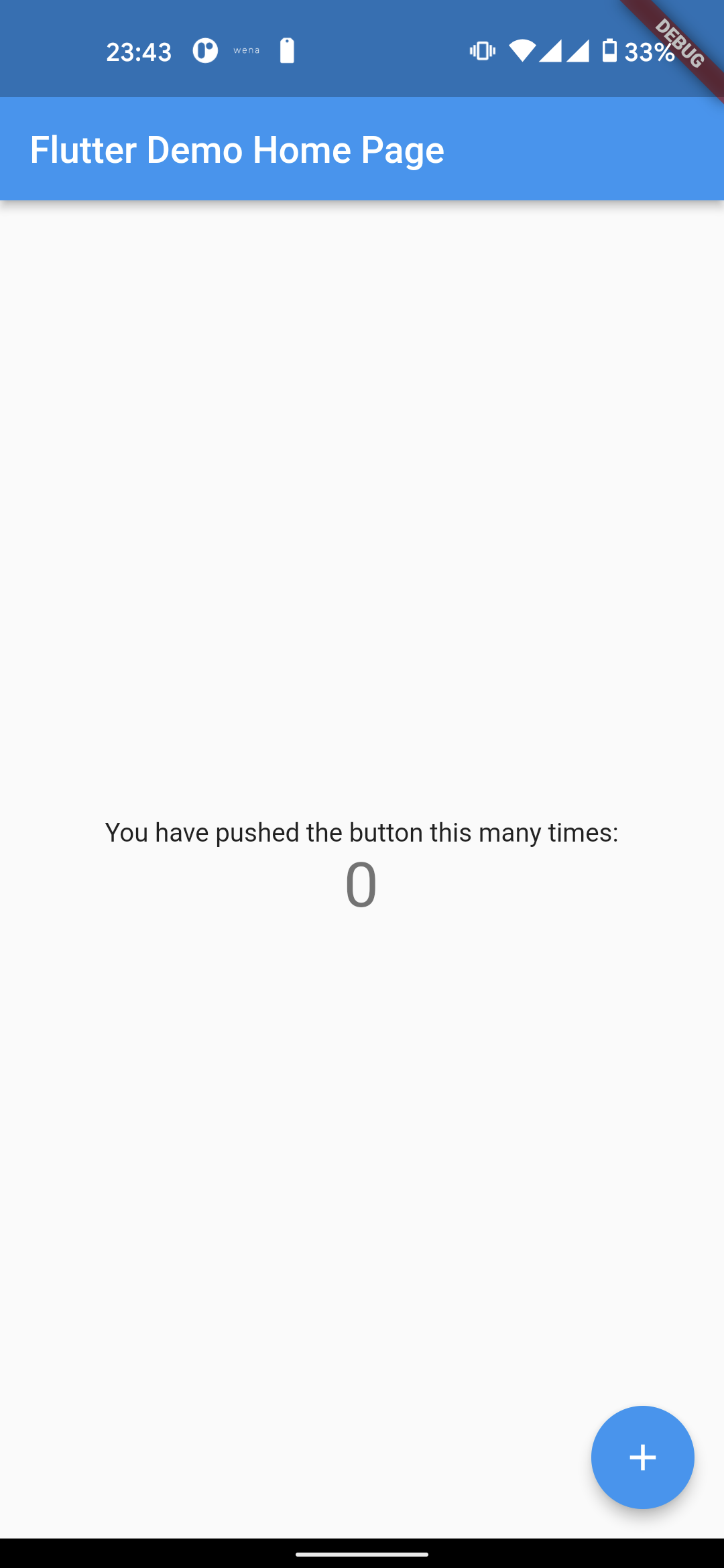
If the app opens on your phone, the setup is complete.
##Wrapping up
I can now develop Flutter mobile apps from WSL2.
Next I’ll focus on learning Flutter well enough to build the apps I have in mind.